The Problem
Before I can analyze malware, write detection rules, or publish a report, I need to find the malware in the first place. That sounds obvious, but the logistics are harder than they appear.
Commercial internet scanning services map the entire IPv4 address space and surface what they find, but professional-tier access is priced for enterprise security teams, not independent research. More fundamentally, they’re general-purpose reconnaissance tools built for broad visibility across the whole internet, optimized for asset discovery and attack surface management rather than persistent monitoring of the specific hostile infrastructure that threat actors actually use. The data is filtered through someone else’s priorities and collection model.
Open-source threat intelligence feeds exist but tend to be reactive, publishing indicators for threats that have already been deployed, detected, and catalogued by someone else. By the time something shows up in a public feed, the window for early warning has often closed. A server hosting novel malware today may be wiped clean, repurposed, or rotated to a new IP range before any feed indexes it.
What I wanted was different. Continuous, focused visibility into the specific infrastructure where malware actually lives. Not the whole internet, just the parts that matter most. The bulletproof hosting providers, the sanctioned networks, the abuse-tolerant datacenters where threat actors stage and distribute payloads with minimal risk of takedown.
So I built a platform to do exactly that. I call it Vantage.
What It Looks For
Two concepts are central to understanding what this platform does: open directories and bulletproof hosting.
Open Directories
An open directory is a web server where the file listing is exposed. Instead of a website, you see a raw index of folders and files, like browsing a shared network drive. Threat actors use these as cheap, disposable staging infrastructure. A typical open directory might contain a remote access trojan (RAT) builder, a credential stealer, a batch of phishing kits, and a folder of stolen credentials, all sitting on a bare IP address with no domain name, no authentication, and no attempt to hide any of it.
These directories are valuable to threat intelligence because they expose an attacker’s full operational toolkit in one place. A single directory can reveal which malware families are being deployed together, what configuration files they use, what credentials they’ve already stolen, and sometimes even their build tools and operational notes. It’s the kind of access that normally requires a law enforcement operation or an insider compromise, except that the attacker left the front door open.
The challenge is that open directories are ephemeral. A server hosting a stealer today may be wiped and repurposed tomorrow. Catching them requires continuous scanning, not periodic checks.
Bulletproof Hosting
Bulletproof hosting (BPH) providers are companies that knowingly host malicious content and ignore or refuse abuse complaints. Some are formally sanctioned by governments, by the U.S. Treasury’s OFAC, by the UK, by Australia. Some operate in jurisdictions that make enforcement effectively impossible. Some simply don’t respond when security researchers or law enforcement report malware on their networks.
These providers are where a disproportionate share of malware infrastructure lives. Not all of it, since threat actors also abuse legitimate cloud providers, but BPH networks have the highest signal-to-noise ratio for this kind of collection. If you scan a bulletproof hoster and find an open directory, the odds that it contains something malicious are very high. If you scan a mainstream cloud provider, you’re mostly finding legitimate file servers, personal projects, and misconfigured development environments.
The platform currently monitors 65 autonomous systems (the network-level identifier for a hosting provider) selected through documented threat intelligence sources: government sanctions lists, established threat intelligence feeds, published cybercrime infrastructure research, and quarterly rankings from cybercrime tracking organizations. Each target is annotated with the specific source that justified its inclusion and the malware families that have been observed operating there, creating an auditable record of why every target was selected.
How It Finds Things
The platform uses three independent discovery methods that run continuously. Each one catches threats the others would miss, and together they provide overlapping coverage of the target infrastructure.
Nightly Port Scanning
The primary discovery engine. Every night during a configurable window, currently 1 AM to 6 AM Eastern when household network activity is at its lowest, the platform scans the announced IP space of all 65 target autonomous systems across 28 ports commonly used for web services.
To understand the scale, those 65 networks contain roughly 13.8 million IP addresses. Scanning all of them across 28 ports means probing hundreds of millions of address-port combinations. On consumer hardware and a residential internet connection, that’s too much to complete in a single night.
So the scan is organized into priority batches. Small, dedicated bulletproof hosting providers, the ones where nearly everything hosted is malicious, are grouped into a single batch and scanned first. These are the networks with the highest signal-to-noise ratio, and they typically finish in two to three hours. Larger, legitimate-but-abused providers run as separate batches afterward, filling whatever time remains.
A hard cutoff stops scanning 5 minutes before the window closes, regardless of progress. This guarantees zero network impact during daytime hours when other people in the house need the connection. Coverage metrics log exactly which providers were scanned, which were deferred, and what percentage of the target space was reached, which shows empirically how the tool is performing and where adjustments might be needed.
Every discovered web server is immediately probed for open directory signatures. Confirmed open directories are queued for full crawling at the highest processing priority.
BGP Monitoring
Bulletproof hosting providers frequently rotate their infrastructure, announcing new IP ranges and withdrawing old ones as they move operations between network blocks. The platform polls global routing databases every 30 minutes for prefix changes across all 65 target networks.
When a new IP range appears, typically a /24 covering 256 addresses, the platform triggers an immediate targeted scan of that space. This catches new infrastructure the moment it comes online, hours or sometimes days before the next scheduled nightly sweep would reach it.
This is particularly valuable for catching short-lived infrastructure that’s spun up for a campaign and torn down before the next nightly scan runs.
Certificate Transparency Monitoring
When someone registers an SSL certificate (the “https” padlock on a website), that registration is recorded in public Certificate Transparency (CT) logs, append-only public records designed to make certificate issuance auditable. The platform monitors nine active CT logs in real time, watching for certificates issued to domains that match suspicious patterns: high-entropy hostnames (random-looking strings that suggest automated generation), known-abused top-level domains (.top, .xyz, .tk), and phishing-related keywords.
When a suspicious certificate is detected, the associated domain is resolved to an IP address. If that IP falls within any of the 65 target networks, the domain gets priority boosting and is queued ahead of normal CT traffic. This catches domain-fronted malware staging that wouldn’t appear in IP-only scanning. A threat actor might register a domain, point it at their bulletproof hosting server, and use it for a few hours before abandoning it. The CT log captures the certificate the moment it’s issued.
How They Work Together
All three discovery sources feed into a single priority queue. The crawling engine processes them in order of expected value:
| Priority | Source | Rationale |
|---|---|---|
| Highest | Port scan / BGP | Confirmed BPH infrastructure, almost certainly hosting malware |
| High | CT domain on target network | Suspicious domain on known-bad infrastructure, elevated signal |
| Normal | CT domain (general) | May or may not be malicious, routine processing |
| Lowest | Scheduled recrawl | Re-checking a known directory, only if workers are idle |
This ensures the most valuable discoveries are always processed first, regardless of how busy the system is.
What Happens After Discovery
Finding an open directory is the cheap part. What makes it useful is everything that happens next, because a directory with 4,000 files in it is not intelligence until something has worked out which of those files is worth a human’s attention.
Crawling and File Classification
When the platform confirms an open directory, a pool of 50 persistent crawl workers walks the full directory structure, following links, checking subdirectories, and cataloguing every file. Each file is evaluated through multiple classifiers:
The extension filter narrows focus to 67 malware-relevant file types: Windows executables (.exe, .dll, .sys), scripts (PowerShell, batch, VBScript, JavaScript), Office documents with macro capability, archives (.rar, .7z), and Mark-of-the-Web bypass containers (.iso, .img, .vhd), the disk image formats attackers increasingly use to evade Windows security prompts that would normally warn users about files downloaded from the internet. The list is tuned over time. Bulk Linux-distro archive formats (.zip/.gz/.tar, .deb/.rpm) were removed once they were found to dominate the processing backlog without carrying Windows malware, while niche execution and MOTW-bypass formats (.msc, .lzh, .arj, .application) were added as those techniques appeared in the wild.
Credential detection runs independently of file type. The platform checks filenames against 18 categories of credential exposure: environment files (.env), SSH private keys, browser credential databases, stealer log archives, combo lists (username/password dumps), cloud access keys, WordPress configurations, and Windows registry hives. A 400-byte .env file with database credentials sitting on a threat actor’s staging server is exactly the kind of finding this platform is built to surface.
The size filter keeps files between 1 KB and 50 MB, small enough to exclude empty placeholders and large enough to include most payloads. Credential files bypass size filtering entirely, because their value is independent of file size.
Multi-Source Reputation Enrichment
Every file the platform finds needs context. Is this a known piece of malware? Is it something new? Is the security industry already aware of it?
Enrichment is layered, not a single lookup. Discovered files and indicators are first screened against a set of free community threat-intelligence feeds: malware-sample databases (MalwareBazaar, ThreatFox), a URL blocklist (URLhaus), and IP-reputation services (AbuseIPDB, OTX). These are unmetered, so they run broadly across everything discovered. A multi-engine file reputation service, the one with a strict daily API quota, answers the deeper question by scanning each file against the full fleet of antivirus and threat-detection engines and reporting how many flag it as malicious. That service is the expensive, rate-limited one, so it is reserved for the highest-value targets, meaning files on confirmed bulletproof infrastructure and files a community feed has already flagged. Layering a cheap, broad pass in front of an expensive, precise one is what stretches a small daily quota across a corpus of millions of files.
A two-tier extension system manages this budget. Tier 1 includes 17 high-signal extensions (executables, DLLs, scripts, disk images) that get immediate lookup when found on confirmed BPH infrastructure. These are the files most likely to be malware, and they consume API quota first. Tier 2 covers the remaining 50 lower-priority extensions, meaning archives, Office documents, and less common formats, which queue for lookup when daily quota allows.
Files discovered through lower-confidence sources (Certificate Transparency logs rather than direct infrastructure scanning) are deprioritized further. This prevents noise from consuming quota that should go to confirmed BPH discoveries.
Each enrichment response classifies the file into a priority tier:
| Priority | Criteria | What It Means |
|---|---|---|
| NOVEL | 0 detections | Unknown to the security industry, potentially unreported malware |
| LOW_DETECT | 1 to 3 detections | Evasive, bypassing most antivirus engines |
| KNOWN_BAD | 20+ detections | Well-known malware, useful for tracking active campaigns |
| SKIP | 4 to 19 detections | Detected by enough engines, lower research value |
NOVEL and LOW_DETECT files are the highest-value findings. These represent malware that the broader security industry hasn’t catalogued yet, which is the kind of early warning that threat intelligence consumers need most.
The Triage Dashboard
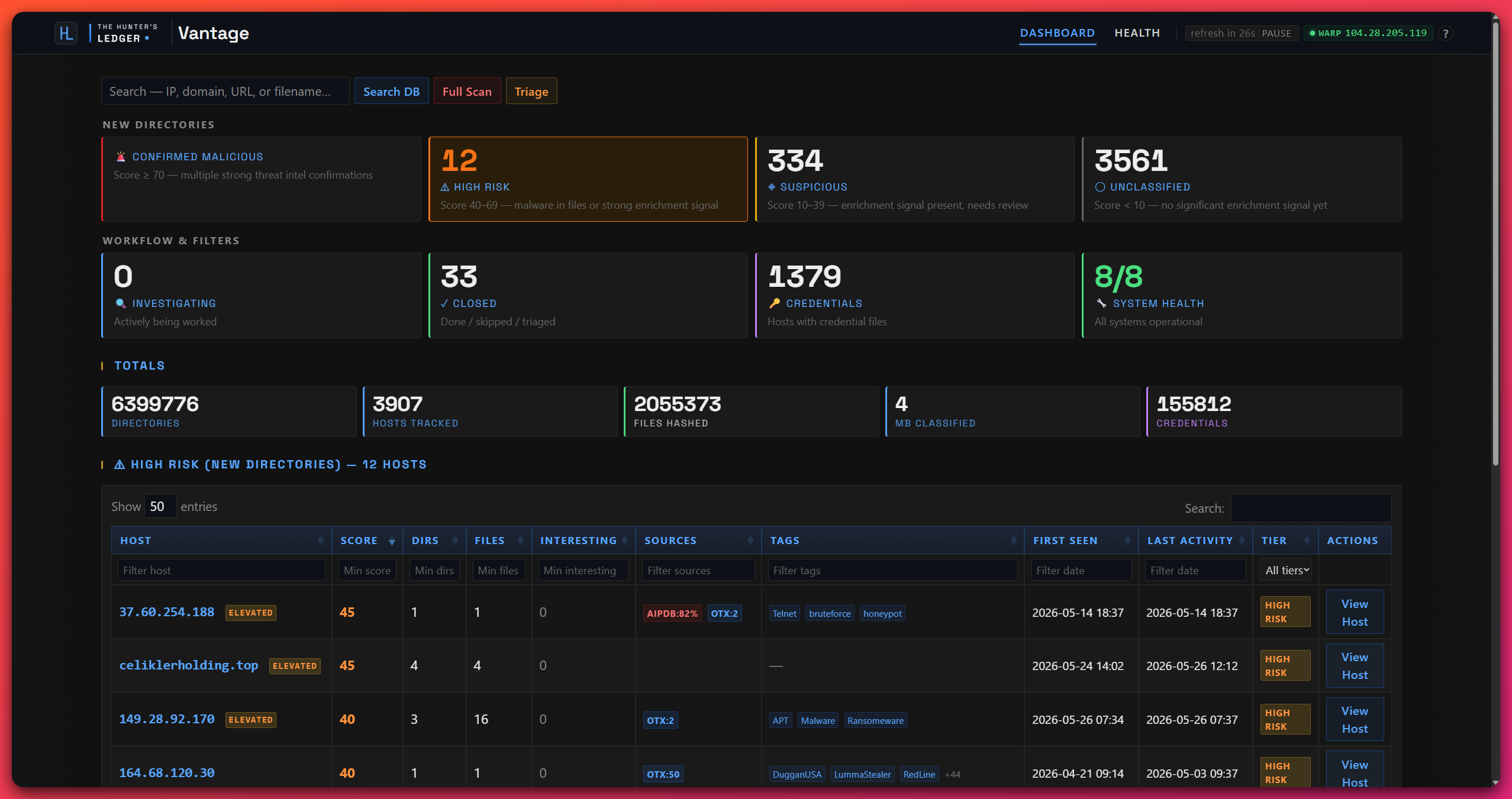
The platform surfaces everything it finds through a dark-themed analyst dashboard. This is where automated collection ends and human judgment takes over. The platform finds and organizes, I decide what is worth investigating.
Tiered Host View
The home page organizes all discovered hosts into severity tiers based on their highest-signal files:
- HIGH, hosts with NOVEL files (zero detections across the engine fleet) in untriaged directories
- MEDIUM, confirmed BPH infrastructure with low-detection payloads, or files still awaiting enrichment
- LOW, Certificate Transparency-sourced hosts where enrichment hasn’t completed yet
- CREDENTIALS, a cross-cutting view showing any host with exposed credential files, regardless of tier
I work top-down, taking high-tier hosts first, then medium, then low as time allows. Each host card shows a count of interesting files, credential indicators, and current triage status.
Host Deep-Dive
Clicking into a host shows the full picture: a directory tree visualization showing every path the crawler found, with file counts and status indicators per directory. A master file table lists every file across all directories, priority-sorted, with columns for filename, extension, detection score, threat family label, download status, credential indicators, and source directory.
Bulk actions let me move fast. Set all directories on a host to a workflow status in one click. Download all interesting files as a priority-sorted ZIP. Reset download tracking for re-investigation.
Download Manager
Files download as password-protected ZIPs, sorted by analysis value: executables and DLLs first (highest priority for reverse engineering), scripts second (stagers and droppers), everything else third. A checkmark tracks what’s already been downloaded so I can work in batches: download a set, transfer to the malware analysis VM, analyze, clear the VM, download the next batch.
Manual Scanner
The search bar accepts any indicator format, whether a bare IP, a domain, a URL, or host:port, and offers two modes. Database search runs a substring match across everything already indexed. Live scan probes the target with the same detection engine the automated scanners use, persists any findings to the database, and triggers background reputation enrichment. This is how I investigate tips from other tools, colleagues, or community reporting. Check whether the platform already has it, or scan it live and add it.
System Health
A dedicated health page shows real-time status for all nine services, covering scanning, crawling, hashing, enrichment, archiving, BGP and certificate-transparency monitoring, the dashboard, and scheduled maintenance, each with its running state, uptime, and last log line.
Alongside that it reports tunnel health (public IP, handshake recency, route verification, with a watchdog that re-checks every 15 minutes), port scanner sweep progress and coverage metrics, and 30-day trend graphs for directories discovered, novel files, low-detection files, credential files, and confirmed malicious files. Service restarts and tunnel profile rotation are available directly from the dashboard.
Why It’s Built This Way
Every design decision reflects the same constraint, that this is a solo research operation running on a single repurposed tower server and a consumer internet connection.
The scope is focused rather than broad, because I cannot scan the entire IPv4 address space. I do not have the bandwidth, the hardware, or the IP reputation. Instead the platform concentrates on 65 autonomous systems where malware actually lives. That trades breadth for depth. I cannot see everything, but I can see the infrastructure that matters most, often enough to catch servers that rotate quickly.
The data layer is a single SQLite file rather than a database server. Nothing external to install and maintain, no separate cache layer, no extra credentials to secure. It handles concurrent access from all 50 crawl workers without contention, and the whole database backs up by copying one file.
Scanning runs at night only, with a hard cutoff. The platform shares a home network with other people, and scanning at 10,000 packets per second during the day would noticeably degrade the connection for everyone in the house. The nightly window, the priority batch ordering, and the cutoff before morning keep the scanning out of normal usage, and the coverage logs show exactly what was and was not reached each night.
All scanner traffic routes through an encrypted tunnel with a kill switch, meaning a firewall rule that blocks everything if the tunnel drops. My home IP never appears in a target server’s logs. A watchdog verifies tunnel health every 15 minutes and restarts it on failure, and tunnel profiles can be rotated from the dashboard for IP diversity.
Reputation enrichment runs on free tiers, rationed deliberately. The daily API quota is a real constraint, but the two-tier extension system and source-based prioritization make sure the highest-value files get checked first. On a typical day every Tier 1 file from BPH infrastructure is enriched within hours of discovery, and Tier 2 files catch up over the following days.
Connections to any single target are throttled by a semaphore, with an optional per-request delay. That avoids tripping web application firewalls or generating abuse complaints, and it keeps the scanning polite even when the infrastructure being scanned is operated by people who do not extend the same courtesy.
What It Produces
The platform is the first stage of a larger pipeline. What it finds goes through the selection pass described below, and whatever survives that becomes an investigation.
Novel malware samples come out first, files with zero detections across the engine fleet, payloads the security industry has not catalogued yet. Finding them early means detection rules can be written and shared before the malware is widely deployed.
Low-detection payloads matter almost as much, malware that is slipping past most antivirus engines. The gap between detected by one engine and detected by forty is where defenders are most exposed, and where early intelligence has the most impact.
Campaign infrastructure gets mapped as a side effect. A single open directory often hosts several malware families, phishing kits, and command-and-control panel artifacts side by side, and indexing the full structure reveals operational relationships between tools, campaigns, and actors that no single indicator would show.
Credential exposure turns up constantly: stealer logs, combo lists, and configuration files with credentials embedded in them, sitting on staging servers. Those give early warning of compromised accounts before they are traded on underground forums or pasted publicly.
And because the platform runs every night, it builds continuous coverage over time. It tracks which servers are active, which have been torn down, and which are being repurposed with new payloads. That dimension is something periodic manual hunting cannot replicate, and it is what makes an individual finding mean something.
The platform doesn’t try to scan the whole internet, and it doesn’t try to replace commercial tools that do. It does one thing well, which is persistent, focused monitoring of the infrastructure where malware lives, designed to be sustained indefinitely by a single researcher with commodity hardware. The samples and intelligence it surfaces are what start the investigation pipeline, and every report published on this site begins with something this platform found.
But surfacing something is not the same as deciding to investigate it, and that decision comes next.
How a Candidate Earns an Investigation
Before anything becomes an investigation it goes through a recon pass, and the recon pass is designed to say no.
It starts wide. I pull every candidate the platform has surfaced in the window I care about, across all signal tiers rather than only the ones already scored as interesting, because the tiering is a heuristic and the interesting things are frequently sitting one tier down. Then a cheap pre-screen drops anything I have already looked at, anything matching a known false-positive shape, and anything obviously commodity.
What survives gets characterized. One worker per candidate pulls the platform’s record, reads and describes the files actually exposed, and runs a reputation check. It comes back with a description and a lean, and deliberately not a decision. Describing a target and deciding to spend a week on it are different jobs, and the second one stays with me.
The question that actually decides it
For each surviving candidate I write down an Intel-Value Hypothesis, which is one sentence answering a specific question: what intelligence would this produce, and who would be able to act on it?
That question is load-bearing because it rejects things that are genuinely interesting. A novel packer is interesting. If the honest answer to “who acts on this” is “nobody, it is one sample on one host and the operator will rotate tomorrow,” it is not worth a report. Conversely a boring commodity stealer sitting on infrastructure that also hosts a credential dump from a named organization has an obvious answer, and that answer is the report.
Every candidate then lands in one of four places. It becomes a Lead and graduates to a full investigation, it gets Parked with a note on what would revive it, it is Rejected, or it needs more enrichment before I can tell.
Rejections are the product
Every recon pass gets written to a numbered record, including the rejects and why. That felt like bureaucracy until the third time I started chasing something I had already dismissed two months earlier for a good reason I had completely forgotten.
Alongside those records is a single accumulating file of what the front of the funnel has taught me. Which hosting networks actually produce, which open-directory shapes are worth a second look and which are always the same abandoned web shell, the specific false-positive patterns that keep costing me an hour. It gets read at the start of every recon pass. It is the difference between doing this for two years and doing the first month twenty-four times.
Once a candidate becomes a Lead it stops being a platform problem and becomes an investigation. I pull the files down to an isolated lab and do the analysis by hand: detonation, static examination, reverse engineering, watching what the sample does to a machine and to the network.
What comes out of that is raw, and turning it into something publishable is the next step.
I built Vantage and I run it, as the discovery layer of The Hunter’s Ledger.