Why This Exists
When I finish analyzing a piece of malware, what I have is scattered. Strings, addresses, a process tree, notes about what the sample did to a machine, a few screenshots, and a running commentary in a text file about what surprised me. It is useful data. It is not intelligence. It does not yet say what the threat means, who is likely running it, how a defender would catch it, or whether any of it is new.
Turning that into something publishable takes several different skills at once. Deep technical reading, source research, detection engineering, writing, review, and a lot of formatting discipline. Doing all of it well, alone, for every sample, is the part that does not scale. This workflow exists because that was a real problem for me, not a hypothetical one. It was built and rebuilt over months of actual analysis work, and every design decision in it came from something going wrong first.
What came out of that is a team of agents, each with a defined role and its own instructions, working against a shared framework of written standards. I provide the raw analysis, the investigative judgment, and the calls that no automated system can make. The workflow handles the rest.
The target has always been the same. Intelligence that reads like it came from a professional third-party provider, technically deep but written to be understood and acted on. Most public threat intelligence misses on one side or the other. It is either too shallow to be useful, or so dense it needs interpreting before anyone can act. I am a defender myself, so I built this to produce the thing I would want to read.
What It Is Not
This does not replace a human analyst, and it is not trying to.
I still choose the samples, run the detonations, read the decompiled code, and decide what a finding actually means. The workflow handles the structured, repeatable half of intelligence production, meaning aggregation, research, drafting, formatting, and review. That frees my time for the half that needs judgment.
Think of it as a capable production team behind one analyst. I am still the one on the hook for what it says.
What Comes Out
Every run targets the same three files, no matter how much or how little goes in.
/reports/[slug]/. What the malware does, what it means for defenders, how it connects to known activity, and who may be behind it when the evidence supports naming anyone./ioc-feeds/[slug]-iocs.json, ready to ingest into a SIEM, EDR, or CTI platform without reformatting./hunting-detections/[slug]-detections/, written to the submission standards of the public rule repositories.Who Does What
It works like a newsroom. An orchestrator runs the desk, and eight specialists each own one part of the job.
| Agent | What it does | Standards it works against |
|---|---|---|
| Orchestrator | Runs the stages, moves data between them, surfaces the checkpoints to me. Not a specialist, it is the desk. | Workflow definition, dispatch templates |
| Malware Analyst | Reads the raw analysis and produces the structured findings document plus the validated IOC feed. | MITRE ATT&CK Mapping, IOC Formatting |
| Research Analyst | Searches for context on the family and the campaign, and rates the credibility of every source it uses. | Source Credibility Assessment, Threat Intelligence Scoping |
| Detection Engineer | Writes the YARA, Sigma, and Suricata rules, and decides which candidate indicators deserve to be rules at all. | YARA / SigmaHQ / Suricata Rule Formatting, Detection Rule Tiering |
| Infrastructure Analyst | Pivots from the IPs and domains into the operator’s wider infrastructure. | Infrastructure Pivoting Playbook |
| Attribution Analyst | Assesses who is behind the activity, and at what confidence. Conditional, and frequently skipped. | Attribution Analysis |
| Report Writer | Synthesizes everything into the report. | Report Structure Template, Voice Charter, Prose Discipline |
| Report Reviewer | Scores the draft from three expert perspectives against a defined bar. | Report Quality Standards |
| Report Editor | Final structural, formatting, and voice pass. | Report Quality Standards, Prose Discipline, Voice Charter |
Two more agents sit outside that line and run when the work calls for them.
A second malware-analysis agent takes the heaviest material, decompiled offensive code and the artifact pile from a live detonation, on a different model. It writes its findings to disk at report altitude and hands back only a distilled summary, so raw offensive code never travels further up the pipeline than it has to.
An adversarial red-team agent reads the working notes and the stage outputs of a finished investigation and tries to break the conclusions. It hunts for facts that were never actually in evidence, connections I stretched, confidence labels that do not match what supports them, and named-source claims with nothing behind them. It is read-only and reports in chat. It cannot edit anything, which is the point. I want a critic, not a co-author.
What an Agent Knows Before It Starts
Each agent works against a skill framework, a body of domain knowledge, methodology, and house standards that exists separately from the agent’s own instructions.
Skills are not prompts. They are reference documents that encode how the work should be done, built from real submission requirements and real methodology. Instructions tell an agent what to do. Skills tell it how to do it correctly. The difference shows up in the output.
A detection engineer without a skill framework writes a functional YARA rule. A detection engineer working against the YARA formatting standard writes one that meets the exact submission requirements of the public repository it is written for: correct metadata fields, properly scoped conditions, no redundant strings, author set to The Hunters Ledger. Without the standard, those details get guessed at.
The same pattern runs across the workflow. Every technique maps to the correct ATT&CK ID with the right evidence level rather than the nearest guess. Every source carries a credibility tier, so a reader knows whether a claim came from a government advisory or an unverified blog. Every attribution claim goes through structured evidence weighting before an actor gets named, which is what stops the overconfident calls that damage a publication’s credibility faster than anything else.
Two standards are shared infrastructure that every agent loads rather than belonging to one role. One governs how agents reach live enrichment services, so indicator lookups pull structured data from VirusTotal and Hunt.io rather than guessing from a web search. The other has agents write long outputs in checkpointed chunks, so a dropped connection halfway through a report does not throw away the work already done.
Deciding what deserves to be a rule
One standard is worth calling out on its own, because it changed what gets published.
Not every distinctive string deserves a detection rule. A rule that matches one hard-coded IP is not a detection, it is an indicator wearing a rule’s clothes, and shipping it as a rule tells defenders they have coverage they do not have. So every candidate now goes through a sort before anything is written. It becomes a Detection rule if it is durable and precise enough to alert on, a Hunting rule if it is broad but worth a hunt team’s time, or it is Cut and routed to the IOC feed where an atomic indicator actually belongs.
That sort is why the detection library is smaller than it would otherwise be, and why the rules in it are worth deploying.
The writing standard
The part I have spent the most time on recently is not the analysis. It is the writing.
Reports produced by a language model have a texture, and once you notice it you cannot stop noticing it. Bolded labels followed by colons. Every section written at the same pitch for the same imagined reader. Em dashes everywhere. Hedged counts where a real number was available. Whole sentences in bold.
None of that is wrong, exactly. It is a confident, characterless register that reads like a form being filled in, and it just does not sound like a person. A report nobody wrote is a report nobody trusts.
So there is now a written voice standard, and it is enforced like any other. It says the author writes in the first person, because I did the work and the prose should say so. It bans the label-and-colon paragraph opener outright, because it is the single most persistent tell. It caps paragraphs at five or six sentences, which is both a readability rule and an accessibility one, since I am dyslexic and read separated text materially more easily. It requires the real figure rather than a hedge, on the grounds that it is my investigation and I counted.
A second standard governs how a report is layered. Reports descend through three registers on one page. The brief at the top is plain and stands on its own. The middle is written for a working defender. The teardown at the bottom is written for a peer with the explanations stripped out, and it collapses by default so the depth is there without the page reading as a wall.
That structure inverted an old pressure. I used to cut technical depth to keep a report readable. Now I add the depth and collapse it.
What Runs Beneath the Agents
Underneath the agents is a layer of hooks and scripts that fires automatically at stage boundaries, without anyone asking. This is what makes the system behave reliably rather than approximately.
Five hooks run on events, not on instruction.
- The quality gate checker fires when the reviewer finishes, reads the score against the threshold, and writes the verdict to the state file. The orchestrator does not get to make that call.
- The research cache manager saves research results by malware family with a 30-day life. On any later analysis of the same family inside that window the research agent is skipped, or runs in an abbreviated update mode that refreshes only what is new.
- The IOC validation hook fires the moment the malware analyst finishes and before anything downstream reads the feed, checking JSON structure, required fields, hash lengths, address formats, and confidence values.
- The detection validation hook fires after the detection engineer and does something more serious than a structural check, which I cover in step three.
- The pre-write backup snapshots any analysis, report, or detection file immediately before it is overwritten, so a bad edit is always recoverable.
Two scanners run on the draft itself before a human is asked to read it.
The first runs 24 mechanical checks against the report: front matter completeness, required sections, IOC and detection cross-references, the line-count ceiling, confidence language, threat-level consistency between the header and the body, the campaign metadata block, embedded IOC tables that should not be there, duplicate H1s that break the page navigation, and a class of angle-bracket placeholder that silently destroys the rendered page. The results go to the reviewer as structured input so it spends its attention on judgment rather than rediscovering formatting problems a script already found.
The second counts the countable half of the voice standard. Declaration colons, label-colon openers, third-person self-references, em and en dashes, hedged counts, paragraphs running past six sentences, empty headings, bolded runs, and coined phrases used often enough to read as a tag.
That second scanner exists because of a specific failure. A report went through the writer, the editor, the reviewer, and a human read, and published carrying 55 declaration colons, three third-person self-references, and six hedged counts. Every rule it broke was already written down. The lesson was not that the standards were missing. It was that countable prose defects will not be caught by reading, so they have to be counted.
The scanner is also explicit about what it cannot see. A flattened emotional register, an invented reaction, a section that never drops register for its depth. None of those are things a regular expression can judge, and it reports them as not checked rather than staying silent. A clean scan clears half the standard and says nothing about the half that matters more.
Parallel Where Possible, Sequential Only Where Necessary
One of the load-bearing design decisions is which agents run at the same time.
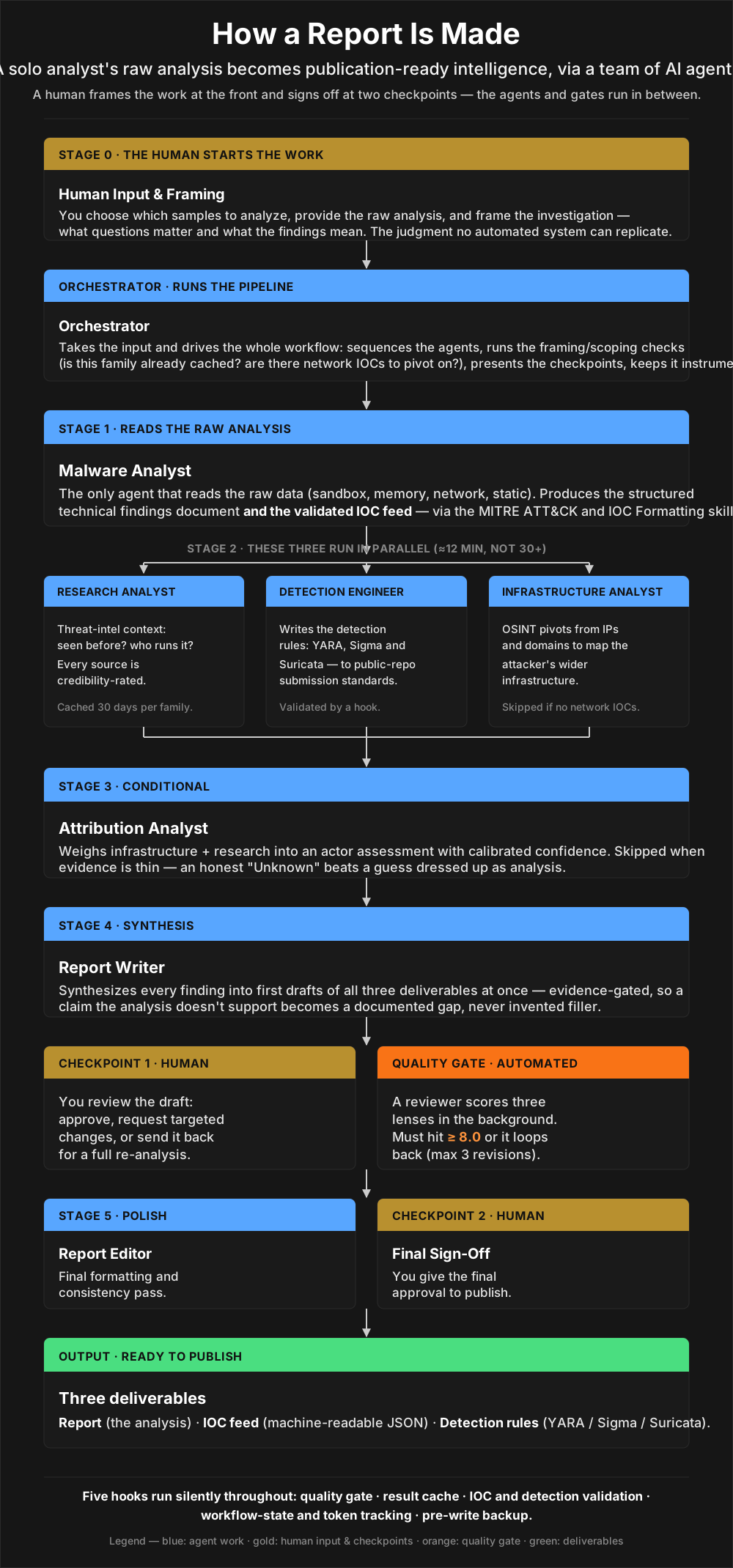
Some agents genuinely cannot start until another finishes. The attribution analyst cannot assess who is behind the activity until the infrastructure analyst has mapped the network side of it.
Others are independent. The research analyst, the detection engineer, and the infrastructure analyst all need only what the malware analyst produced. They do not need each other. So all three go out in a single dispatch and run at the same time, like three specialists working different parts of one investigation. That turns more than 30 minutes of sequential waiting into roughly 12, bounded only by whichever agent takes longest.
A state-tracking hook logs the exact launch and completion time of every agent throughout. That gives me a timestamped record of where the time actually went, and whether a parallel batch really ran in parallel or quietly drifted into sequence. It is not just automation, it is instrumented automation.
Each Stage 2 agent also writes a compact summary alongside its full output. Downstream agents read the summary first and only open the full file when they need the detail. For the report writer and the attribution analyst, which have to synthesize everything the parallel batch produced, that cuts what they have to read without costing any depth.
What Actually Happens
Here is a full run end to end, from the point where I have finished my own analysis to the point where three finished files are waiting for me to sign off on.
Stage 0, I frame the work
Before any agent runs, I answer a short set of scoping questions. What is this investigation about, what is in scope, what is the campaign called, what evidence exists and where does it live. That produces a scoping card the whole rest of the workflow reads from.
This stage also collects the file I care most about. Throughout an investigation I keep raw notes of my own reactions, what stood out, what was clever, what bored me, what I could not close. That file becomes the spine of the report’s voice. It is the one input the agents may never invent: where it is silent, the report stays silent.
Stage 1, the malware analyst reads everything
The orchestrator hands over the raw evidence. This is the only agent that reads it directly. It produces one organized findings document covering what the files are, what the malware does when it runs, what it touches on disk and in the registry, how it persists, where it connects, and which ATT&CK techniques it exercises with the evidence for each.
Alongside that it validates and formats every extracted indicator into the machine-readable feed, applying confidence ratings and filtering the false positives that always creep in, like common system binaries and legitimate software domains.
The IOC validation hook fires immediately afterwards. Everything downstream works from these two files.
Stage 2, three agents at once
The orchestrator runs two checks first. Is this family already cached from a recent analysis, and did Stage 1 actually find network indicators worth pivoting on? A purely local sample with no network activity gives the infrastructure analyst nothing to do, so it gets skipped rather than dispatched to produce nothing.
Then the three go out together. The research analyst asks whether this has been seen before and what is publicly known, rating every source it cites. The detection engineer takes the behavioral signatures and writes the rules, tiering each candidate before writing it. The infrastructure analyst pivots from the addresses into the operator’s wider footprint through passive DNS, WHOIS, certificate data, and ASN enumeration.
The detection validation hook fires when they finish, and it is not a formatting check.
Stage 3, attribution, if it is warranted
Before the attribution analyst runs at all, the orchestrator asks whether there is enough evidence to say anything. If the infrastructure read is weak and the research read is weak, attribution would be speculation, so the agent is skipped and the report says plainly that the actor is unknown and why.
When it does run, it produces an assessment that always carries the same five things: who, at what confidence and percentage, why that level, what is missing, and what evidence would raise it. Those five are a content requirement, not a template. They get written as prose, because a stack of bolded field labels reads like a form rather than an analyst talking.
If the activity cannot be tied to a publicly named group but is coherent enough to track, it gets an internal tracking designation instead of a name. The report always explains what that designation is, because a reader who searches for it and finds nothing has every reason to lose confidence.
Stage 4, the report writer drafts everything
The writer receives all of it: the technical findings, the validated indicators, the research context, the detection rules, the infrastructure map, the attribution assessment, and my raw notes. It drafts the report against the structure standard, the voice standard, and the prose standard together.
It does not embed IOC tables or rule code in the report body. Those live in their own files and get referenced. That keeps the report readable and the data files machine-usable.
One constraint governs everything here. The report may only contain claims the analysis actually supports. If something was not observed, it says so. Generic filler that would be true of any malware regardless of what was found is not allowed through.
Checkpoint 1, I read the draft
The orchestrator does two things at once. It launches the reviewer in the background, and it presents me the draft.
While I am reading, the reviewer is already scoring in three lenses: whether the findings are technically right and the confidence language is calibrated, whether every finding connects to something a defender can actually do, and whether the top-level brief is genuinely accessible to someone who is not a malware analyst.
I can approve, ask for targeted changes, or send it back for a full re-analysis. By the time I have decided, the score is usually already in.
The quality gate
On approval the mechanical checks run against the draft, and their results go to the gate alongside the reviewer’s score. Clear the threshold with no critical issues and the workflow moves to polish. Miss it and the writer revises against the specific feedback and loops, up to three cycles.
Stages 6 through 6.6, polish and pictures
The editor does the final pass: structure, terminology, formatting, and the de-slop pass against the voice standard, with the scanner as its first step rather than its last.
Then two conditional stages. If the investigation produced screenshots, they get mapped to the sections they actually belong to, given real captions, and checked for lab artifacts that should never ship. If the report has multi-stage loader chains, process trees, or kill chains that no screenshot covers, hand-authored SVG diagrams get built for them.
Checkpoint 2, and then publishing
I sign off on the finished deliverables. Approval means the work is good, not that it goes live. Publishing is a separate, explicit step, and it defaults to an unlisted preview rather than straight to the front page. What happens after that is step three.
When the Evidence Is Thin
Everything above still happens when there is only one file instead of five. The same agents, the same stages, the same three outputs. What changes is that the workflow adapts honestly instead of filling the gaps.
The malware analyst can only report what it finds. With a single static sample there may be no behavioral data and no network activity at all. The findings document is structured the same way, but the sections it cannot fill say so, and that propagates accurately through every stage downstream.
The dispatch checks matter more here. No network indicators means the infrastructure analyst is skipped and Stage 2 becomes a two-way parallel run. A known and recently cached family means the research analyst is skipped too, and sometimes the whole of Stage 2 is one agent finishing in a few minutes. Attribution is more likely to fail its feasibility check and be skipped entirely.
When that happens the report does not guess. It states that attribution was assessed as insufficient, lists the specific gaps that prevented it, and names what evidence would close them. That is more useful to a reader than a guess dressed up as analysis.
A short report with four well-evidenced findings and three acknowledged gaps is worth more than a padded one that invented plausible content to fill a template. Honest gaps are a feature.
Why It Works This Way
Evidence comes first, always. No agent may generate plausible content to fill a gap, and where the evidence does not support a claim the gap gets documented instead. That is the whole basis for trusting the output.
Confidence is calibrated rather than asserted. Every significant claim carries a confidence level, what supports it, and what is missing. “HIGH, three independent sources corroborate, minor timeline gaps” is worth more than a naked assertion that something is definitely APT28.
The workflow scales to the input. It does not run agents that have nothing to contribute, so two files with no network indicators get a different agent set than five files with rich behavioral data.
Parallelism happens wherever it can. Every minute spent waiting on a sequential agent that could have run alongside another is wasted, so dependencies are mapped and anything independent goes out together.
The human checkpoints sit at the decisions that matter. The workflow automates the labor and I keep the judgment calls, and there are two points where nothing proceeds until I say so.
Nothing here is trusted because it reported success. An agent saying its work went well is not evidence that it did. That principle earned its own page, and it is the next one.
The goal has not changed since the first version of this. Turn analysis into intelligence the defender community can actually use, structured, repeatable, and evidence-based, at a standard of accuracy that makes it reasonable to act on.
Threat intelligence published months after a threat went active is history, not intelligence. A raw analysis that never becomes a report, and detection rules that never get shared, are just missed opportunities for the people who needed them. Everything in this system exists to close that gap without cutting the corners that would make the output not worth reading.